The Appliance Era of 3D Printing: A Full Review of the Bambu Lab A1
For over a decade, getting into 3D printing meant accepting a steep learning curve. Beginners were forced to spend hours manual bed-leveling, tuning retraction settings, and troubleshooting failed prints.
Then came Bambu Lab.
While their high-end, enclosed CoreXY printers (the X1-Carbon and P1S) disrupted the industrial space, the Bambu Lab A1 brings that exact same "it just works" philosophy to the open-frame, budget-friendly desktop market. If you are looking for a reliable machine that turns digital designs into multi-colored physical reality with zero mechanical tinkering, the A1 is the current gold standard.
Here is everything you need to know about the Bambu Lab A1 ecosystem.
Unboxing to Printing in 20 Minutes
The Bambu Lab A1 belongs to the "bed-slinger" family of printers, meaning the build plate moves along the Y-axis while the toolhead travels along the X and Z axes. Historically, budget bed-slingers arrived as massive boxes of loose bolts and unlabeled wires.
The A1 flips the script. It arrives roughly 85% pre-assembled. All you need to do is screw the gantry to the base using a few pre-loaded bolts, snap the toolhead cover into place, and plug in a handful of clearly labeled cables. From opening the cardboard box to watching the machine autonomously complete its first test print takes less than 20 minutes.
Core Specifications & Raw Power
Don't let its friendly, clean aesthetic fool you—the A1 boasts top-tier hardware configurations built for high-performance output:
- Build Volume: 256 x 256 x 256 mm (a spacious standard footprint for masks, cosplay parts, and mechanical designs).
- Blazing Print Speed: Can reach top speeds of up to 500 mm/s with an acceleration rate of 10,000 mm/s². In practical terms, a print that takes 8 hours on a traditional budget printer finishes in under 2.5 hours on the A1.
- All-Metal Hotend: Heats up to 300°C right out of the box, allowing you to print standard PLA and PETG, as well as tougher structural engineering materials like TPU (flexible rubber) and Nylon.
- 30-Second Quick-Swap Nozzles: Unlike traditional hotends that require heated wrenches and risk burning your fingers, the A1 features a toolless clip mechanism. You can swap from a standard 0.4mm nozzle to a fine 0.2mm detail nozzle in seconds.
The Smart Automation Difference
What truly separates the A1 from its competitors isn't how fast it prints, but how hard it works to prevent failures. The printer relies on a suite of internal sensors to completely automate the calibration routine:
1. Full Auto Calibration
Before every single print job, the A1 performs an autonomous choreography. It maps the bed topography using automated bed leveling, calculates the perfect nozzle distance (Z-offset), and shakes itself to measure frame resonance (input shaping). You never have to turn a leveling knob again.
2. Active Flow Rate Compensation
Inside the print head sits a tiny eddy-current sensor that measures the internal pressure of the melted filament in real-time. If the printer detects slight variations in filament thickness, it instantly tweaks the motor extrusion speed to prevent ugly under-extrusion lines or messy blobs.
3. Active Motor Noise Cancellation
High-speed stepper motors are notoriously loud, emitting high-pitched whines as they move. The A1 runs an algorithmic check on its motors before printing to inject countering frequencies. The result is a printer so exceptionally quiet you can easily hold a phone call or sleep in the same room while it runs at top speed.
Going Multi-Color: The AMS Lite Upgrade
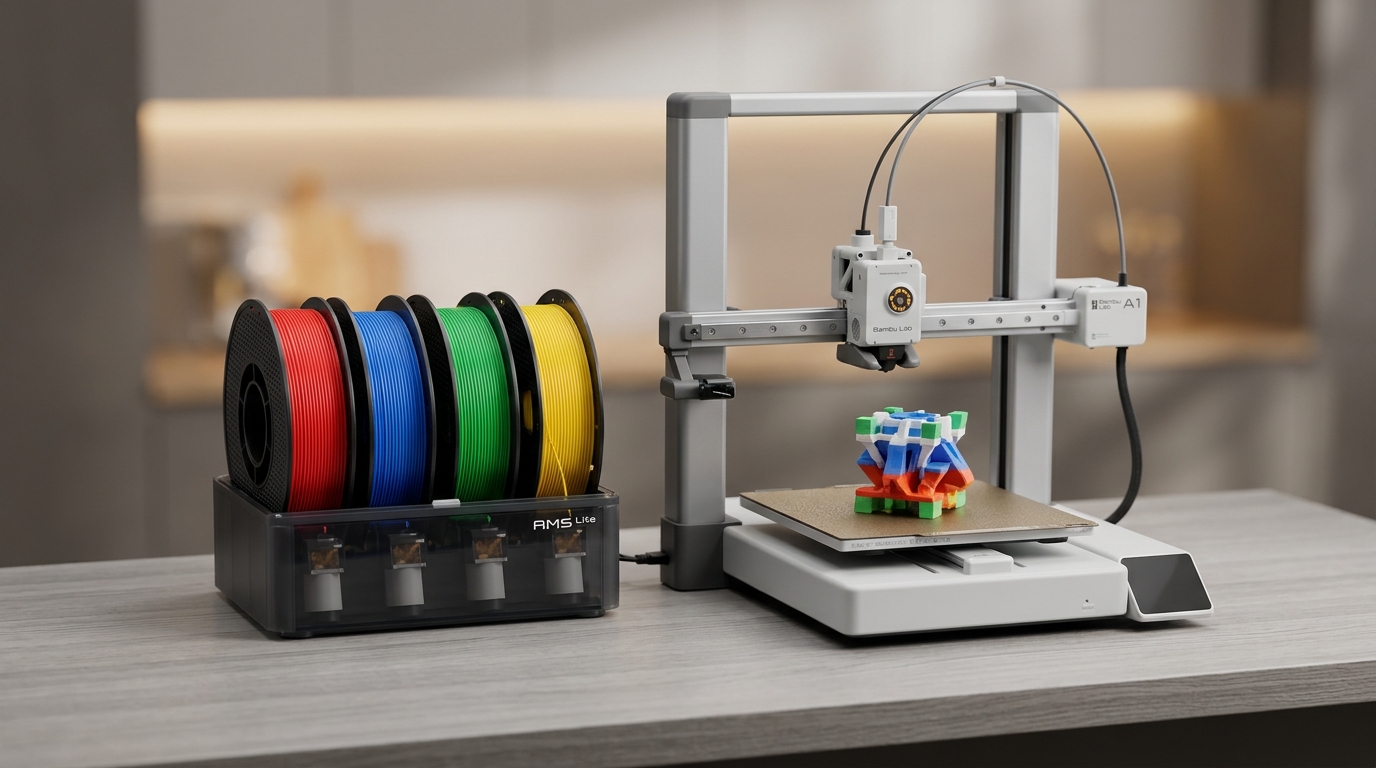
While you can buy the A1 as a standalone single-material machine, it truly shines when purchased as the A1 Combo, which includes the AMS Lite (Automatic Material System).
The AMS Lite sits right next to the printer, holding up to four separate spools of filament simultaneously. When you slice a multi-colored model in the Bambu Studio software, the printer automatically pulls back filament A, snips it inside the toolhead, purges the nozzle, and feeds in filament B mid-print.
Beyond making colorful toys, the AMS Lite is incredibly useful for engineering parts. You can load three spools of structural PETG and one spool of specialized breakaway support material. The printer will use the support filament only where needed, allowing you to pull support structures off your finished model effortlessly, leaving perfectly pristine overhang surfaces.
Weighing the Options: Pros and Cons
Every piece of technology has tradeoffs. Here is what to keep in mind before clicking buy:
| The Advantages (Pros) | The Limitations (Cons) |
|---|---|
| Flawless user experience: Genuine appliance-like operation requires zero manual tuning. | Open-frame environment: Lacking an enclosure means it is highly sensitive to room drafts and cannot reliably print warp-prone materials like ABS or ASA. |
| Incredible speed & quality: High-speed motion components deliver exceptionally smooth wall surfaces. | Desk real estate monster: The AMS Lite must sit right next to the machine, practically doubling the total desktop workspace width needed. |
| Seamless Software Eco-system: The Bambu Handy mobile app and Bambu Studio desktop software make remote camera monitoring and cloud slicing effortlessly smooth. | Filament Waste: Changing colors forces the toolhead to push out old plastic into a discard chute, creating a pile of plastic "poop" during complex multi-color runs. |
The Verdict: Who is the Bambu Lab A1 For?
The Bambu Lab A1 is an absolute triumph of user-centered design.
If your goal is to master the intricate mechanics of 3D printer building, calibration, and custom firmware modification, this machine might feel too automated for you.
However, if your goal is to focus on design, modeling, and production—or if you simply want a highly reliable machine that brings your ideas to life quickly and beautifully without the headaches—the Bambu Lab A1 is the absolute best desktop 3D printer in its price bracket.